5 best Canopy software alternatives for accounting firms



 Copied to clipboard.
Canopy is running the workflow, which means the engagement letters still go out manually, the invoices sit unpaid for weeks, and payment reconciliation happens in a spreadsheet nobody trusts. That disconnect between practice management and getting paid is why firm owners start looking for something better.
When you evaluate Canopy software alternatives, you're looking at practice management, billing, or proposal-to-payment platforms that can cover what Canopy doesn't fully address, particularly around billing automation, client agreements, and payment collection. Knowing which problem you're solving for before comparing any platform saves a lot of wrong turns.
The five alternatives here address two distinct problem areas: workflow and project management on one side, and billing-to-payment automation on the other. Some tools cover both. Some do one exceptionally well. The breakdowns below give you a decision framework to match the right platform to the specific operational problem your firm is trying to fix.
Key takeaways
- Switching to a workflow-first Canopy alternative may replicate the same billing and collections shortfall, leaving firms still chasing invoices manually.
- Canopy repositioned in August 2026 as a proposal-to-payment operating system, so firms should verify whether its updated product already addresses their specific needs before switching.
- Firms whose primary pain is accounts receivable often need a front-office billing layer.
- A two-tool stack pairing a practice management platform with a purpose-built proposal-to-payment tool can close operational gaps that no single Canopy alternative covers completely.
- Collecting payment authorization upfront at proposal signing can significantly reduce late payments for accounting firms.
How we chose these alternatives
Every Canopy alternative here is evaluated on two criteria: internal workflow and task management, and how completely the tool connects client agreements to billing and payment collection.
Those criteria map directly to where firms with 30 or more recurring clients lose time and revenue. Disconnected engagement letters, manual invoice follow-up, and the lag between a signed agreement and collected payment are real costs, and generic platform comparisons rarely surface them.
In the 2026 AICPA PCPS Top Issues Survey, technology and AI change management ranked first by expected five-year impact across all CPA firm sizes. Tool selection is now a strategic decision as AI and cloud technology reshape accounting firms.
Two popular tools were excluded: Bonsai, following its December 2025 acquisition by Zoom and the resulting roadmap uncertainty, and DocuSign, whose payment-on-signing capability sits behind a Business Pro upsell rather than a purpose-built accounting workflow.
Learn how AI helps streamline accounting workflows.
See which AI tools are making the biggest impact for accounting firms today.
Canopy alternatives compared by firm need
Each tool on this list solves a different primary problem, so the wrong choice means paying for capabilities that don't address your firm's situation.
Use this table to match your firm's primary need to the right starting point before reading the full breakdowns below.
Tool | Primary use case | Best firm type | Billing and payments |
| Ignition | Proposals, engagement letters, billing, and collections | Firms with recurring clients and AR problems | Upfront payment collection; AutoCollect for QBO and Xero invoices |
| Karbon | Workflow, task management, and team collaboration | Multi-staff firms needing structured job tracking | Billing, Payments, Engagements, Upfront Payment Collection, Recurring Billing, Auto-payments, and Branded Engagement Letters |
| TaxDome | Tax-focused practice management with client portal | Tax preparers and CPA firms with high client volume | Basic invoicing included; no automated upfront payment collection |
| Financial Cents | Lightweight practice management for small firms | Solo and small accounting or bookkeeping firms | Basic invoicing; no proposal-to-payment automation |
| Jetpack Workflow | Job and workflow tracking for bookkeeping teams | Bookkeeping firms managing recurring monthly work | No native billing; integrates with separate payment tools |
1. Ignition, for proposal-to-payment automation
Ignition is the right Canopy alternative for firms whose primary need is AR resolution, client agreements, and client onboarding through to payment collection.
What Ignition does
Ignition connects proposals, engagement letters, billing, and payment collection in one workflow, so a signed proposal automatically triggers billing without a manual handoff. Branded online proposals include e-signature, and bulk engagement letter sending handles high-volume client bases at renewal time.
AutoCollect imports outstanding invoices from QuickBooks Online (QBO) or Xero and collects them through Ignition. Smart Billing calculates variable fees tied to headcount via Gusto, removing manual calculations each month.
AutoPricing applies bulk price increases across multiple clients at renewal without revisiting each agreement individually. Instant Bill handles ad hoc or out-of-scope work on the spot, so unbilled work doesn't slip through.
Where Ignition fits best
Ignition is the strongest fit for firms managing 30 or more recurring clients where manual invoice follow-up or disconnected agreements are creating persistent AR problems.
For firms with outstanding invoice backlogs, the reduction in accounts receivable is direct and measurable.
The proposal and renewal workflow also aligns with where the profession is heading. The 2025 AICPA MAP Survey of more than 1,400 firms found that CPA firms are shifting toward value and fixed pricing models, and Ignition is built for that billing structure.
Ignition doesn't replace practice management or tax workflow tooling. There's no native time tracking, tax return status management, job tracking, or multi-staff assignment inside the platform.
Firms that need those functions will still need a dedicated practice management tool. Without one, delivery workflows, job queues, and staff assignments have no home.
That mismatch is also why Ignition often works best as a front-office layer. It handles proposals, billing, and payment collection, while a practice tool handles everything behind the client signature. Pairing Ignition with a practice management platform gives firms both sides of that equation without compromise.
2. Karbon, for workflow and task management
Karbon is built for multi-staff accounting firms that need structured job tracking, team task assignment, and client collaboration as their core operational foundation. If workflow visibility across a growing team is the primary concern, Karbon addresses it directly.
Its capabilities have expanded significantly. Billing, Payments, Engagements, Upfront Payment Collection, Recurring Billing, Auto-payments, and Branded Engagement Letters are all now part of its platform, making it a more complete practice management suite than it once was.
The distinction from Ignition is one of depth and focus. Karbon's billing and payment features sit inside a broader practice management platform. Ignition's proposal-to-payment workflow is purpose-built for the client agreement and collections lifecycle.
Firms whose biggest problem is accounts receivable automation rather than internal workflow may find that distinction matters more than it first appears.
3. TaxDome, for tax-focused practice management
TaxDome is the right Canopy alternative for high-volume tax and CPA firms that need client portals, document management, e-signatures, and tax workflow consolidated in one platform. Its design centers on practice management breadth rather than AR automation.
TaxDome consolidates client portal access, secure messaging, document storage, e-signatures, tax workflow automation with status tracking, CRM-style client records, and basic invoicing in one system.
Clients interact through a branded portal where they upload documents, receive secure messages, and sign returns electronically. Staff track return status across the workflow and handle communication without switching between tools.
It’s the strongest fit for high-volume tax preparers and CPA practices whose primary frustration is workflow. If your team spends hours each season chasing document uploads, sending status updates, and managing client emails across dozens or hundreds of individual returns, TaxDome’s client portal and document workflow address that directly.
TaxDome’s billing capabilities don’t extend to upfront payment authorization, proposal-to-payment workflows, or automated collection of outstanding invoices from QuickBooks Online (QBO) or Xero. For firms managing 30 or more recurring clients with persistent AR problems, that shortfall is significant.
Firms switching away from Canopy primarily because of billing and collections shortfalls are likely to find TaxDome replicates that same limitation and are often better served running TaxDome and Ignition together.
4. Financial Cents, for small firm operations
Financial Cents is a lightweight practice management platform built for solo practitioners and firms with fewer than five staff that need structured workflow without enterprise-level complexity or cost.
Its core functions cover workflow and task management, a client portal, time tracking, and basic invoicing, enough for small teams managing a straightforward recurring client base.
Firms switching from Canopy primarily to reduce AR or automate upfront payment collection will find Financial Cents falls short, as it doesn't offer proposal-to-payment automation or automated upfront payment collection. For those use cases, a platform built around billing and payment collection is a more direct fit.
5. Jetpack Workflow, for bookkeeping firms
Jetpack Workflow is built for bookkeeping firms that need clear visibility into recurring monthly jobs across the team. Its core capabilities include recurring job templates, workflow status tracking, client management, and team task assignment, giving bookkeeping teams a structured way to see where every client engagement stands at any point in the month.
But Jetpack Workflow doesn't include native billing or payment collection. That limitation matters for firms managing accounts receivable across 30 or more recurring clients.
For those functions, Ignition handles proposals, engagement letters, billing, and payment collection as a separate layer. Firms with both needs often run Jetpack Workflow for job tracking and Ignition for the client-facing revenue side.
Canopy itself: What it does well
Staying with Canopy is a reasonable choice for many firms. In August 2026, Canopy repositioned as a proposal-to-payment operating system with Payments, Time and Billing, and Engagements and Proposals as named product areas, alongside its established tax workflow, client portal, and document management capabilities.
Before evaluating alternatives, confirm whether Canopy's current product already addresses your firm's needs. The case for Ignition isn't that Canopy lacks these categories. It's that Ignition goes deeper for firms focused on billing and collections.
A firm that needs tax workflow, document management, and a portal in one system may find Canopy's updated product meets its needs without adding another tool.
Building a stack: Ignition plus a practice tool
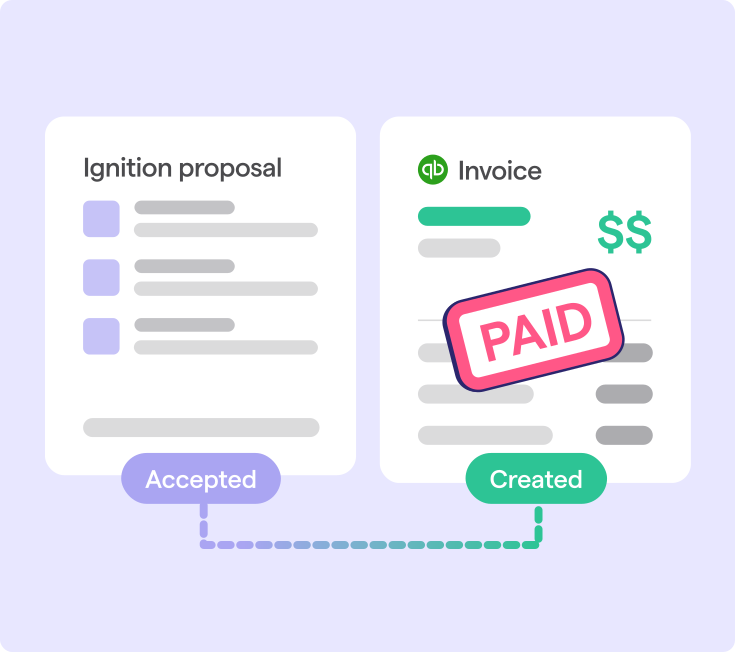
A two-tool stack serves firms better than a single Canopy replacement when Ignition runs proposals through payment, and a practice management platform runs workflow, tasks, and client records. These layers don't overlap; they hand off.
Payments flow into Xero, QuickBooks Online (QBO), or Gusto, so no disconnected data silo forms. And while it costs more on paper, a purpose-built collections layer that reduces AR and automates payment collection can recover more revenue than the added subscription cost.
Which alternative matches your firm's needs
Choose a Canopy alternative by identifying whether workflow or revenue collection is the higher-cost problem, then deciding whether one suite or a two-tool stack solves it most directly.
That sequence maps directly to the five alternatives.
- Karbon fits multi-staff firms with structured workflow needs.
- TaxDome suits high-volume tax CPA practices that need client communication and document management in one place.
- Financial Cents works for solo and small firms with lightweight workflow needs.
- Jetpack Workflow serves bookkeeping teams managing recurring monthly jobs.
- Ignition fits firms whose primary problem is manual billing, outstanding invoices, or the disconnect between a signed agreement and collected payment.
No single tool on this list replaces Canopy's full feature set. The decision is about which problem costs your firm most right now. For firms moving toward value or fixed pricing, a platform that connects pricing decisions directly to billing and payment collection solves that most directly.
Stop chasing payments before you switch tools
Switching practice management platforms can fix a lot. It can improve task visibility, strengthen client communication, and reduce the friction of day-to-day workflow. One thing it can't do is close the gap between a signed engagement letter and a collected payment, especially when those two things live in different systems.
Firms that leave Canopy for a workflow-first alternative will still be chasing invoices manually if the proposal-to-payment connection isn't addressed.
Ignition doesn’t replace Canopy for practice management. It's purpose-built for firms whose primary pain is AR, disconnected engagement letters, and billing that doesn't follow a signed agreement.
Stop chasing payments and start getting paid upfront.
See how Ignition connects proposals, billing, and payment collection in one workflow.
Frequently asked questions
-
Ignition integrates directly with QuickBooks Online and Xero, syncing invoices and payment data automatically after a client agreement is signed. Ignition's AutoCollect feature imports outstanding invoices from either platform and collects payment from stored client details, eliminating manual reconciliation steps. Firms already running QBO or Xero can connect Ignition as a front-office billing layer without replacing their existing accounting platform.
-
Ignition's Contracts and Engagement Letters product supports bulk sending across large client lists, with e-signature collection and automated billing triggers built into the same workflow. For CPA practices managing 100 or more clients, this removes the manual document prep and email follow-up that creates a compliance bottleneck at renewal season. A signed engagement letter in Ignition automatically triggers billing, which no standalone e-signature tool replicates.
-
Financial Cents is designed for solo practitioners and small firms needing lightweight workflow management, task tracking, and a client portal at a lower price point than enterprise-grade tools. It doesn't include proposal-to-payment automation or automated upfront payment collection, so firms whose primary pain is accounts receivable will need a different solution. The right starting point depends on whether the firm's core problem is workflow visibility or billing and collections.
-
Ignition's AI Price Insights draws on real billing data from 8,500 or more Ignition customers to surface personalized pricing benchmarks for individual services. No practice management alternative on this list replicates this capability, because it requires a large dataset of actual professional services billing transactions. Price Insights is embedded directly in the proposal and renewal workflow, so acting on a pricing recommendation takes one click.
-
Outstanding invoices from QuickBooks Online or Xero can be imported into Ignition using AutoCollect, which then collects payment from stored client card or bank details without manual follow-up. Switching platforms doesn't require writing off or manually chasing existing accounts receivable balances. Firms with persistent invoice backlogs may find that the collection automation alone recovers enough revenue to offset the cost of adding a purpose-built billing layer.