The ultimate guide to automated invoicing in Australia



 Copied to clipboard.
Automated invoicing uses technology to create, send, track, and manage client invoices and payments with less manual work. For Australian accounting, bookkeeping, and professional-services firms, it can reduce repetitive administration, improve accuracy, and make it easier to get paid. As client numbers grow, automation provides a more manageable alternative to paper invoices and manual processing.
Key takeaways
- Automated invoicing streamlines the creation, delivery, payment, and reconciliation of client invoices.
- The five key benefits are time savings, cost savings, fewer errors, greater efficiency, and a better customer experience.
- A typical four-step workflow collects payment details, creates and sends invoices, processes payment, and marks invoices as paid.
- Australian professional-services firms should evaluate payment collection, billing flexibility, client agreements, scope changes, reporting, integrations, and security.
What is invoice processing?
Before going any further, let’s establish what invoice processing is.
Invoice processing refers to the tasks involved in receiving, validating, and paying supplier invoices. This process includes receiving invoices from suppliers, verifying the accuracy of the information, matching the invoices to purchase orders and contracts, and processing payments to suppliers.
The typical workflow includes these steps:
- Receive invoice from the supplier.
- Enter the data into the accounting system.
- Validate the data to make sure it’s accurate and complete. This includes verifying that the invoice amount matches the purchase order and contract details.
- Route the invoices to the appropriate person or department for invoice approval.
- Finally, process the payment.
Supplier invoice processing generally concerns accounts payable. This guide primarily focuses on accounts receivable: automating invoices sent to clients and collecting payment for professional services.
Although it’s straightforward, manual invoice processing can be time-consuming, making it well suited to automation.
For large organizations, this process may take as long as 25 days between the manual data entry, validation, and invoice approval workflows.

What is automated invoicing?
Automated invoicing – sometimes called invoice automation – refers to the use of technology to automate the invoicing process from end to end.
An invoice automation tool can automate the time-consuming tasks associated with invoice processing, such as manual data entry, invoice matching, and invoice approvals.
Depending on the organization (and its accounts payable processes), streamlining invoices can also be part of a broader accounts payable automation strategy.
When implemented properly, invoice automation can speed up your financial processes and pave the way for faster payments, which means professional services providers like you can reduce the time you spend chasing funds and improve cash flow.
What is an automated invoice processing solution?
An automated invoice processing solution is a platform that helps create, schedule, send, and manage invoices and client payments. It can populate invoice details, schedule when bills are sent, and make it easier for clients to pay. This saves time and effort, reduces errors, and makes the invoicing process easier to manage.
The 5 benefits of automated invoice processing
Why automate your invoice processing? There are a lot of benefits for businesses of all sizes. These include:
1. Time savings
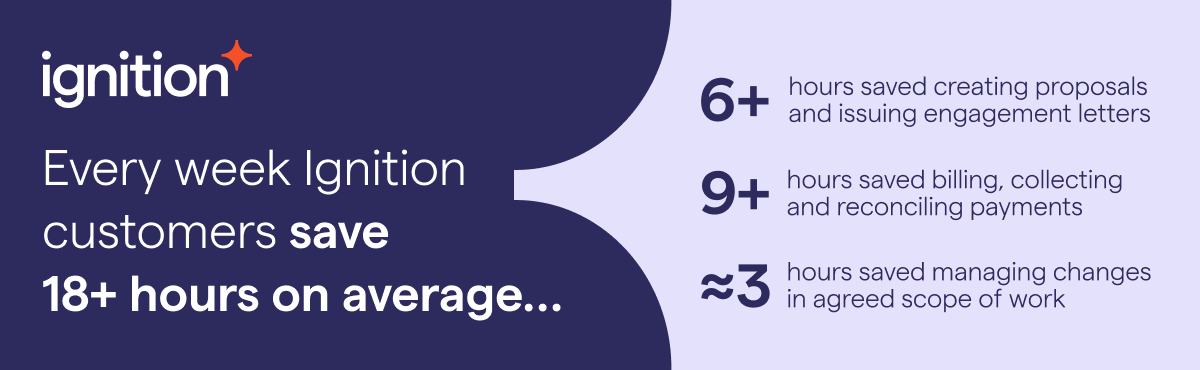
Automation in general saves companies large amounts of time, especially when you use a platform such as Ignition, which is built for professional service providers.
Over half (59%) of customers say they’ve saved time and improved efficiency since implementing Ignition.
In the instance of automating invoice processes, you save time on manual data entry, invoice matching, and invoice approval workflows. This gives your staff the time they need to focus on more value-added activities, such as customer service or business development.
2. Cost savings
Thanks to the time savings, automated invoice processing actually helps businesses save money on administrative tasks such as data entry and paper-based processes.
Additionally, automated invoicing can help to reduce late payment fees and improve cash flow. Ignition’s data supports this: over half (54%) of customers say they've improved cash flow since implementing Ignition.
3. Reduced errors
Automated invoice processing minimizes mistakes because it removes the possibility of human errors, such as typos, miscalculations, and missing information.
The reduction of errors improves the accuracy of financial records and helps prevent fraudulent activity, payment scams, and lost vendor invoices. This can also reduce delayed payments since you can pretty much guarantee that your invoices are sent on time.
4. Improved efficiency
With the reduction of time, effort, and errors, automation generally improves the efficiency of your invoicing process, reducing bottlenecks and delays.
Let’s say you run a an accounting firm that bills clients. By implementing an automated invoice processing solution, you can speed up and reduce the steps necessary to send invoices and process payments. This means you and your team can spend fewer billable hours on admin tasks.
Meanwhile, your client’s accounts payable team will be happy, because there’s less back and forth with paying bills.
5. Improved customer experience
Speedy, accurate invoices help remove friction from the payment process, leading to happier customers excited to do business with you again.
That’s why it pays to use a system with invoice processing automation capabilities. Almost half (49%) of customers say they’re able to offer a better client experience since implementing Ignition.
In fact, when you automate your invoice processing, you can even provide your clients with a little extra incentive to enjoy the system. You can offer them early payment discounts. (This is a great benefit for you as well, since early payment on accounts receivable improves your cash flow. Win, win!)
How does automated invoice processing work?
Automated invoice processing follows four main steps: collect client payment details, create and send invoices, process payment, and mark invoices as paid. The exact setup depends on your client agreements, payment terms, and accounts payable process. Here’s how the workflow operates in an automated invoicing platform such as Ignition.
Step 1. Collect client payment details upfront
The invoicing process starts at the proposal stage, when your software enables you to collect your client’s payment details upfront. As soon as your client accepts your proposal, invoices can be raised automatically through the accounting system you have connected to your solution, such as MYOB, Quickbooks Online or Xero.

Step 2. Create and send invoices automatically
Based on the fees you’re charging, and your billing schedule (for example, recurring billing for your retainer and billing on completion for a project), you can choose to have automated invoicing platform like Ignition, send bills automatically and collect payment on the date of your choosing.
All the necessary fields in the invoice are populated based on these settings. In addition to basic client information (that is, company name and address, contact details, and so on), your invoicing software should automatically itemize the services you provide to a client and the corresponding amounts based on your agreement.
Step 3. Payment is processed
Once your client approves their invoice, the next step is getting paid. The specifics of this step depend on you and your client’s agreed payable processes. If you're using software to automate your invoicing, then payments should be a breeze.
Most invoices sent by automated invoicing software contain a payment button so clients can enter their payment data and pay their bills with just a few clicks. Depending on how you’ve configured your system, your clients should be able to pay by credit card or debit card, direct debit, automated clearing house (ACH), or other methods, depending on your location.
Additionally, if you’re implementing early payment discounts, your invoice automation software should be able to collect the right payment amounts.
Step 4. Invoice marked as paid
When your invoices are paid, they are automatically reconciled and marked as paid, then a receipt can be sent out automatically, if you choose.
Automated invoicing software that takes the hassle out of getting paid, can end late payments for good. With Ignition, effortless set-and-forget client billing and automatic payment collection means you don’t have to chase late payments and can finally eliminate accounts receivable.

Features to look for in automated invoice processing solutions
Australian professional-services firms should evaluate how a platform handles payment collection, billing flexibility, client agreements, scope changes, reporting, accounting integrations, and security. These capabilities can help simplify the full invoicing workflow rather than automating only a single task.
Look for: Automated payment collection
Look for: Robust and customizable invoicing capabilities
It should go without saying, but automated invoice processing systems must have the ability to generate and send invoices to your customers.
Every firm and client is different, so features that can automate different payment terms (for example, retainers, milestones, and hourly billing) are a must.
In addition, the solution should offer customizable email templates for invoice notifications, allowing you to personalize the communication with your clients. This feature makes your proposals stand out by allowing you to tailor your proposal communications to your client.
Look for: Automated engagement letters
The platform should be able to send new clients engagement letters or client agreements (aka contracts). These documents define the scope of work, responsibilities, and terms of engagement between you and a client.
Although an engagement letter is not invoicing per se, it’s still important to have one signed before you invoice the client. It helps to manage client expectations further down the road, especially if there are requests for out-of-scope work.
Unbilled out of scope work can lead to cash flow pressure that affects long term growth. Ignition’s State of client engagement in Australia report shows that accountants and bookkeepers in Australia estimate the out-of-scope work that hasn’t been fully billed for is costing their business $103,778 on average each year.
Look for: Scope change functionality
Out-of-scope requests are common for professional services businesses. So, automated invoicing software that enables you to easily revise the description, price, quantity, billing details (and more) of your services when the project scope changes, is essential.
A platform that includes scope change functionality offers a better experience for your clients too, because you’re offering them the flexibility to adjust their services if their needs change during the engagement or agreement period.
Look for: Reporting dashboards
A helpful reporting feature is a business intelligence dashboard with the ability to report on the key performance indicators (KPIs) related to invoicing. This means providing information on how much money you’ve invoiced and what your monthly averages are, creating revenue forecasts, and more. You should also be able to report on the invoicing process itself – that is, how many outstanding invoices you have, the average cost of an invoice, and so on.
Look for: Excellent integrations
It’s imperative that your automated invoice management solution can integrate with your accounting system, so you can set and forget invoicing and reconciliation, and stop doing it all manually.
Look for: Top-notch security features
Given that automated invoice processing software has to store large amounts of sensitive data from both your business and your clients, it’s an absolute must that the system comes fully loaded with excellent security features, such as data encryption.
Automate invoicing and payments with Ignition
Ultimately, an automated invoice management system gives businesses of all sizes peace of mind that invoicing and payments are being managed effectively. With the amount of time and money automation saves, getting started is a no-brainer.
For businesses wanting to get paid faster, an all-in-one platform like Ignition – that automates and optimizes proposals, client agreements, billing, payment collection and workflows – can put an end to late payments, unbilled work and mundane repetitive admin for ever.
Are you ready to discover the difference? Watch a demo and see Ignition’s powerful business tools in action.

FAQs
-
Automated invoicing uses technology to manage invoicing from end to end. It reduces manual tasks such as data entry, invoice creation, and payment processing. It can also make client billing easier to manage.
-
The workflow starts by collecting client payment details. The platform then creates and sends invoices before processing payment. Paid invoices can be reconciled and marked as paid automatically.
-
Automated invoicing saves time and can reduce administrative costs. It helps minimize errors and improve efficiency. Faster, more accurate billing can also improve the customer experience.
-
Review client agreements, payment terms, and billing schedules. Confirm that the platform integrates with your accounting system. Choose capabilities that support payments, scope changes, reporting, and security.