What are the best QuickFee alternatives for CPA firms?



 Copied to clipboard.
Tax season closes and half your invoices are still sitting in someone's inbox, waiting on a signature or a follow-up email. A client asks for extra cleanup work mid-engagement, and by the time you get around to billing for it, the moment and the fee have passed.
QuickFee alternatives help certified public accountant (CPA) firms and other professional services firms manage client billing, payment collection, or fee financing. Firms may be reassessing QuickFee following its ownership change, reviewing financing costs, or looking to connect separate proposal-to-payment workflows. The strongest alternatives bring proposals, engagement letters, billing, scope changes, and collections into one workflow.
This guide compares what each platform solves, where it falls short, and how it fits firms managing retainers, projects, or time-and-materials work.
Key takeaways
- QuickFee alternatives should be compared by how well they support proposals, engagement letters, billing, payments, and collections in one workflow.
- The Aiwyn acquisition gives CPA firms a timely reason to reassess whether QuickFee still fits their payment collection plans.
- Fee financing can help clients manage large invoices, but it may not solve scope creep, manual invoicing, or disconnected billing tools.
- Ignition, Anchor, Bill.com, and Canopy each address different parts of the QuickFee alternatives market for CPA firms.
- The best QuickFee alternative for many firms may be the platform that improves cash flow while reducing proposal-to-payment admin.
What is QuickFee and why are firms looking for alternatives now?
QuickFee centers on fee financing, while many CPA firms now want client agreements, billing, scope control, and payment collection working as one connected system. Cash flow pressure, administrative overload, scope creep, and uncertainty following QuickFee’s acquisition are all reasons firms may be evaluating options.
The Federal Reserve payment data shows that digital collection is now a baseline expectation for clients. Before comparing vendors, list the specific agreement, billing, scope, and collection gaps a replacement must address.
Who bought QuickFee? The Aiwyn acquisition explained
Aiwyn acquired QuickFee's U.S. payments business in September 2025. That's the ownership change firms are asking about.
An acquisition like this may prompt firms to review vendor contracts, active payment plans, connected integrations, data handling, and any migration requirements tied to a new owner's systems. It’s a worthwhile review, but it should not be treated as evidence that service or functionality will change.
Start by pulling your current QuickFee agreement and listing every active client payment plan tied to it. Then check which accounting or billing integrations depend on that connection, confirm what client communications reference QuickFee directly, and note any migration steps required before adjusting how the firm collects payments.
What to look for in a QuickFee alternative
CPA firms should evaluate a QuickFee alternative by workflow fit, pricing model, payment options, accounting integrations, scope control, and how much manual administration it removes. If manual invoice follow-ups, separate agreement tracking, and unbilled advisory work sound familiar, these criteria matter directly to your bottom line.
Unlike consumer Buy Now Pay Later (BNPL) tools, firm-specific alternatives are designed around professional services billing workflows. Lifecycle coverage and total ownership cost turn these into a practical scorecard. For help defining scope itself, see how to choose which advisory services to offer.
Full client billing lifecycle vs. point-in-time fee financing
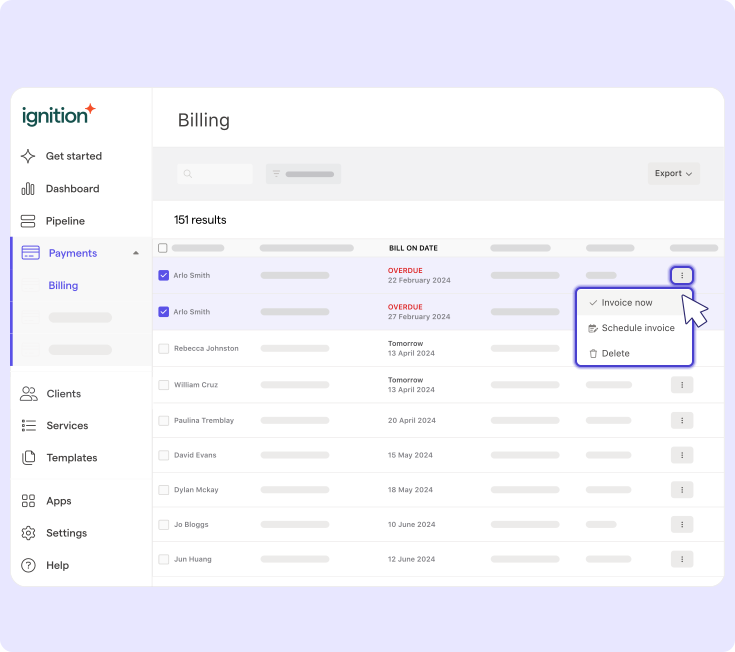
A full-lifecycle platform keeps proposals, agreements, billing, collections, renewals, and scope changes connected, while fee financing primarily changes payment timing. Financing tools step in once an invoice exists and spread out when a client pays. A lifecycle approach, like the workflow behind agency billing software, carries the accepted proposal into billing and collection while keeping the same terms connected throughout.
This gap shows up fastest when a client asks for extra advisory work mid-engagement. Without a connected system, that request needs separate approval, a new invoice, and manual follow-up to collect. With automated pricing and billing solutions, the added scope can remain connected to the agreement and billing process.
Test this on one active client now. Trace the engagement from proposal to renewal and mark every point where someone re-types information or chases a signature.
True cost of ownership: Financing fees vs. subscription pricing
A fair cost comparison has to include financing charges, payment-processing costs, subscription fees, staff time spent administering billing, and revenue lost when extra work never gets invoiced. Published rates only tell part of the story. QuickFee's own FAQ states that Pay Over Time is free for firms, but client interest rates vary and aren’t published, so a like-for-like comparison requires your own numbers.
Sort the real cost into four buckets:
- Recurring platform fees
- Transaction and processing costs
- Hours your team spends reconciling and chasing payments
- Dollar value of scope changes that went unbilled last quarter
Pull your own billing and time-tracking data into each category rather than relying on any vendor's advertised rate. For guidance on building pricing that reflects true cost, review these data-driven pricing strategies and this breakdown of managing rising costs when pricing services.
Once billing costs are under control, firms often look to cut administrative time further with automation. The AI tools webinar covers tools firms can consider as part of that effort.
Comparison at a glance
The right pick among QuickFee, Ignition, Anchor, Bill.com, and Canopy depends on whether financing, proposal-to-payment automation, accounts receivable (AR), or practice management matters most to your firm right now. Each platform emphasizes a different piece of the client revenue workflow.
Platform | Best fit | Billing workflow coverage | Payment collection | Scope control |
| QuickFee | Firms needing client fee financing | Payment timing only | Financed installment payments | Not addressed |
| Ignition | Firms wanting proposal-to-payment automation | Proposals, agreements, billing, renewals | Automated collection tied to accepted terms | Change orders and Instant Bill |
| Anchor | Firms needing automated AR | Billing and collections | Automated invoicing and AR | Limited scope-change handling |
| Bill.com | Firms centered on bill pay and AR | Bill payment and receivables | Strong AR automation | Not addressed |
| Canopy | Firms needing practice management | Workflow, documents, billing | Basic billing tools | Not addressed |
Pick two options that map directly to your biggest gap. If unbilled scope work is reducing revenue, shortlist platforms that connect scope management with billing. If your bottleneck is unpaid invoices, weigh AR capabilities against practice-management depth before committing to a switch.
Top QuickFee alternatives for CPA and professional services firms
Each alternative below is compared on best fit, core limitation, and migration relevance, so you can match strengths and gaps to your firm’s workflow.
Ignition
Ignition is the strongest fit for firms that want proposals, engagement letters, billing, and automated payment collection running through a single platform instead of stitched-together tools. That single-workflow approach matters most for firms currently juggling separate apps for quoting, e-signature, and invoicing, then manually reconciling all three.
AutoPricing helps firms apply pricing consistently as proposals go out, Smart Billing integrations connect accepted agreements with Xero or QuickBooks, and the Deals pipeline gives owners visibility into where each prospect sits before signature. Once a client accepts, automated payment collection helps manage invoicing and follow-up.
Before migrating, set up one recurring engagement to confirm how renewal billing works, then trigger a scope change mid-engagement to see how quickly updated terms flow into billing.
Anchor
Anchor is a relevant QuickFee alternative for firms that want automated billing and AR running in the background, without necessarily needing a full proposal-led revenue system out front. Its focus on billing and collections may suit firms that already manage engagement terms elsewhere.
Compared with Ignition, Anchor is less focused on engagement letters and scope-change handling. A CPA firm managing recurring advisory packages needs a documented, client-approved record of what changes when the scope changes, so firms should evaluate how those approvals connect to Anchor's downstream billing workflow.
Test this directly during evaluation: take a recurring advisory package, add a mid-engagement change, and check whether the platform updates billing automatically or requires a separate manual step outside it.
Bill.com
Bill.com is a suitable QuickFee alternative for firms whose main friction is bill payment and AR rather than the full engagement lifecycle. It handles vendor payments, invoicing, and AR follow-up well, which covers a real gap for many firms.
Bill.com can work with an accounting system to manage payments and receivables, while QuickBooks or Xero handles the books. That pairing works for payment processing, but it doesn't touch how engagements get proposed, priced, or signed.
Ignition covers that ground directly, turning an accepted proposal and engagement letter into billing and automated payment collection, with scope-creep protection built into the same workflow. Before migrating, check whether Bill.com's AR strengths would still leave you running separate proposal and agreement tools.
Canopy
Canopy fits firms whose biggest gap is internal: workflow management, document storage, and client management sitting alongside billing.
That focus sets it apart from a sell-to-get-paid workflow like Ignition's, where a signed proposal automatically moves a client into billing and starts payment collection, connecting the agreement to the invoice directly.
Before choosing between them, decide which problem costs more time.
- If disorganized documents, tasks, and client records are slowing the team down, Canopy's practice-management depth solves that directly.
- If unbilled work and slow collection are hurting cash flow, look closely at how each platform turns an accepted proposal into paid revenue.
Ignition vs. QuickFee: What's different
QuickFee centers on financing when a client pays an invoice, while Ignition connects the entire client revenue workflow from proposal to renewal.
That difference shows up daily. Accepted terms in Ignition drive billing, payment collection, and renewals while keeping scope changes connected to the agreement, cutting handoffs between separate tools and giving firms clearer client acceptance and steadier cash flow.
For a detailed feature-by-feature breakdown, see Ignition vs. QuickFee.
Beyond payments: Engagement letters and scope-creep billing
Ignition starts before the invoice, using accepted agreements, change orders, and Instant Bill to help firms define scope and collect revenue for extra work. Each accepted client agreement defines scope, price, and payment terms upfront, giving billing a clear reference point from day one.
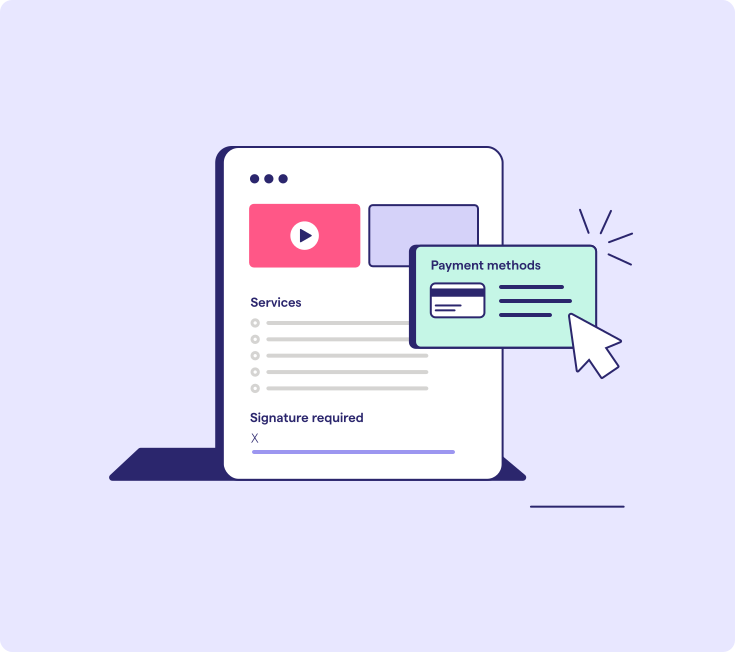
A tax client mid-engagement asks for bookkeeping cleanup that was never part of the original scope. The firm's first move is to confirm the request falls outside the signed agreement, then document the extra work and its price directly against that client's record.
From there, the path splits based on how long the work will last:
- Confirm the cleanup request sits outside the accepted scope.
- Document the added work and its price.
- Issue a change order if the active agreement itself needs to change going forward, or use Instant Bill for a one-time ad hoc charge that doesn't warrant amending the engagement.
- Collect payment and keep that activity tied to the client record for a complete history.
Change orders make sense when the cleanup signals a lasting shift in the relationship, like a client who clearly needs ongoing catch-up work. Instant Bill fits a single fix that ends once it's done.
Either way, the firm can collect payment without waiting for the next billing cycle, and the added revenue stays connected to the same client file instead of living in a separate spreadsheet or email thread. That connection keeps extra work from quietly going unbilled.
For a deeper look at capturing this kind of revenue consistently, see how to maximize revenue opportunities.
Choose a billing partner built for the whole client relationship rather than the payment alone
A billing partner must cover the whole client relationship, not just the payment moment, because fee financing alone doesn't solve engagement letter follow-up or scope creep that eats into margins on audit season add-ons. The right platform has to hold the whole client relationship together beyond the moment money changes hands.
This week, pull up the last engagement that ran over scope and trace what happened next. Did billing catch it automatically, or did someone have to remember to send a new invoice? That single answer says more about a firm's real payment problem than any comparison chart.
Ignition keeps that workflow connected from signed proposal through renewal, so scope changes stay tied to the agreement and billing.
Cover the whole client relationship.
See how Ignition connects proposals, scope changes, and billing automatically from signature through renewal.
Frequently asked questions
-
Client volume, open payment plans, connected integrations, and how standardized a firm's engagement letters and billing schedules are determine how long a QuickFee migration takes. Firms can reduce disruption by mapping active clients, recurring charges, stored payment methods, open balances, and accounting integrations before moving any workflows. A phased transition can keep existing obligations stable while new proposals, billing schedules, and payment collection move to the replacement platform.
-
Existing QuickFee payment plans may need to remain active until they are paid off, while new recurring billing moves to the replacement platform. The firm should review each plan's authorization terms, client communication requirements, reconciliation process, and provider obligations before changing collection activity. No firm should migrate or cancel an active plan without confirming how it will handle the remaining payments.
-
Consumer Buy Now Pay Later (BNPL) apps are rarely direct alternatives for accounting firms because they are designed for retail checkout rather than ongoing professional services relationships. CPA firms typically need engagement letters, recurring invoices, tax season billing, accounting integrations, payment collection, and controls for work that falls outside the agreed scope. A professional services billing platform is a more relevant comparison than a consumer installment product.
-
Firms should support both Automated Clearing House (ACH) payments and card payments where possible because each method suits different client needs. ACH may be practical for larger recurring invoices, while cards provide a familiar and convenient option for clients who prefer them. The right platform should let the firm offer flexibility while keeping authorization, billing, reconciliation, and collection manageable.
-
A firm should run a workflow test using one real engagement, one recurring invoice, and one scope change before selecting a platform. The test should confirm whether the option reduces manual administration, keeps agreements and billing aligned, protects revenue from extra work, integrates with the firm's accounting platform, and gives clients a clear approval and payment experience. Document the results against the same evaluation criteria for every shortlisted option. Start your free trial with Ignition to test proposal-to-payment workflows before making a broader switch.