When do Karbon users need a billing alternative?



 Copied to clipboard.
Karbon keeps deadlines organized and tasks assigned, yet the invoice for last month's bookkeeping retainer is still sitting half-drafted, waiting for someone to copy client details into QuickBooks. When work is complete but billing still depends on manual handoffs, firm owners may start looking for Karbon alternatives.
Firms may look beyond Karbon when their internal workflow, client engagement, billing, or payment needs outgrow the platform. The right fit might be another practice management platform, a dedicated billing layer, or both running side by side.
Diagnosing which gap you're facing determines whether the next move is a new practice management platform, a billing layer, or both.
Key takeaways
- Karbon alternatives often solve internal workflow problems, but they may not fix proposals, billing, payments, or scope creep.
- Firms comparing Karbon alternatives need to separate practice management needs from client engagement and revenue automation needs.
- Switching to another practice management platform can leave late payments and manual invoicing untouched if billing is still disconnected.
- Ignition can complement Karbon and similar tools by turning accepted proposals into automated billing, payments, and downstream workflows.
- Accounting firms evaluating Karbon alternatives face billing gaps when retainers, engagements, and out-of-scope work are managed across disconnected tools.
When do Karbon users need something beyond practice management?
Karbon users need something beyond practice management when tasks and deadlines are under control but proposals, invoices, payments, or scope changes still require manual handling. Internal work can look organized on the surface while the client-facing side of the business runs on email threads, spreadsheets, and follow-up calls.
Recurring invoice delays, engagement letters that need chasing for signatures, and no clear view from accepted work to collected cash are the trigger points to watch for.
Trace one recent engagement from signed proposal to collected payment before deciding anything. Walk through proposal acceptance, work creation, invoice creation, payment authorization, and payment collection, and mark every point where someone re-entered data or sent a manual follow-up.
Practice management vs. client engagement: Use the distinction to diagnose a billing gap
Firms can diagnose the right tool category by separating internal delivery coordination from the client-facing path of scope acceptance, billing, and payment collection. A team can see every deadline in its practice management platform and still rely on manual processes elsewhere in the revenue workflow.
Sort each pain point into one of two buckets, delivery coordination or revenue collection, before comparing platforms.
What Karbon and similar tools handle well
Karbon and comparable practice management platforms excel at organizing assignments, tracking deadlines, centralizing client communication, and keeping teams accountable for their work. They give a firm one place to see who owns a task, when it's due, and where a client request stands.
TaxDome, Canopy, Financial Cents, and Jetpack Workflow all compete in this same broad category, and each is worth evaluating on internal workflow fit.
Before considering a migration, open your current platform and check three things. Does every task show a clear owner, due date, and current status? Can you trace a client request from submission to completion? If yes, the biggest gap may sit elsewhere.
Where practice management can fall short: Proposals, billing, and payments
A practice management platform can still leave parts of the revenue workflow disconnected after a proposal is accepted, including scheduled billing, payment authorization, and collection.
Portals and internal messaging may keep a team updated, but firms still need to evaluate how scope, client sign-off, recurring invoices, renewals, and payment collection are handled.
If accepted work is visible to your team but proposal details still get retyped into a separate invoicing tool, and payment follow-up happens by email, that's the same re-entry point the earlier trace-through exercise is meant to catch.
Comparison at a glance
Karbon, TaxDome, and Canopy are primarily practice management options, while Ignition focuses on the client-facing layer for proposals, billing, payments, and scope control.
Criteria | Karbon | TaxDome | Canopy | Ignition |
| Primary role | Practice management | Practice management | Practice management | Client engagement and revenue automation |
| Internal coordination | Tasks, deadlines, workflows | Workflows, portal | Tax workflow, documents | Not a core function |
| Scope acceptance | Not a core function | Engagement letters | Engagement letters | Proposals, e-signature |
| Billing and payments | Not a core function | Invoicing add-on | Invoicing add-on | Smart Billing, payment collection |
| Renewal control | Not a core function | Manual renewal | Manual renewal | Automated renewals |
The right choice depends on where the firm's friction sits. If internal delivery already runs smoothly, replacing the practice management platform may not address problems with scope, billing, or collection.
Signs your firm needs a billing layer instead of a new PM tool
Late cash and unbilled work can signal a revenue operations problem rather than a task management problem. If work is done and tracked but payment lags, another practice management tool may not fix the underlying issue.
Test that diagnosis against one recent client engagement, especially who approved any scope changes, how the renewal was priced, and what happened after the client accepted.
Late payments and unpredictable cash flow

Late payments can point to a billing gap when completed recurring work still depends on manually issued invoices and delayed client payment authorization rather than a missed task reminder.
A bookkeeping firm finishes its monthly close, sends the invoice by email, and then waits, following up until the client finally authorizes Automated Clearing House (ACH) payment weeks later. More than half of U.S. small businesses report being owed money on overdue invoices, with 47% of those overdue by more than 30 days.
More task alerts won’t fix that. The firm still needs to address how invoices are created and how payment details are collected.
Pull the last five recurring invoices and measure the days between invoice date and payment authorization. Anything stretching past your standard payment terms can help confirm whether the bottleneck sits in collection rather than project management.
Scope creep and unbilled work
Scope creep turns into revenue leakage when extra work has no fast path to approval and billing. A tax client mid-engagement asks for advisory work on a new business structure, the accountant answers questions over email and delivers guidance, but the firm never issues a change order.
- Before: Hours of advisory work go out the door without a price attached or an invoice trigger.
- After: The firm documents the same request as a scope change, prices it, secures the client's approval, and adds it to the billing workflow before delivery starts.
Map three roles for every engagement, including who flags extra work, who approves the new price, and how that approval reaches billing without manual re-entry.
Popular Karbon alternatives for internal workflow management
TaxDome and Canopy are worth evaluating when the actual problem is internal workflow fit rather than revenue collection.
Judge both against the same criteria, including workflow preferences, portal requirements, document handling, tax-process fit, and firm size. Applying this checklist consistently helps prevent a mismatched migration and keeps the focus on the problem you’re trying to solve.
TaxDome
TaxDome is a relevant Karbon alternative for firms prioritizing portals, document handling, and client communication as the deciding factors in a practice management switch. Firms drawn to TaxDome may want a cleaner way to collect signatures, share files, and communicate with clients in one place.
That fit is separate from proposal-to-payment automation, change orders, and recurring billing, which firms should evaluate as part of the broader revenue workflow.
Before choosing, identify whether the actual friction is client information exchange or the path from accepted scope to collected payment.
Canopy
Canopy is a relevant Karbon alternative for firms that need tax workflow, document management, and client portal capabilities inside their day-to-day delivery process. Its core strength is organizing how work moves internally.
Those are separate decisions. Canopy strengthens tax-process visibility and document handling while a billing layer standardizes engagement acceptance, invoicing, and collections.
Before switching, identify which gap costs more: unclear tax-process tracking or manual revenue handoffs. Pull one recent client file and check where the friction starts.
Why switching practice management platforms alone won't fix billing problems
A practice management migration can tighten up internal delivery while leaving billing friction untouched. Moving from Karbon to another PM platform might improve task visibility and team accountability, but that's a different problem from late payments, manual invoicing, or unbilled work.
Task management and revenue automation solve related but distinct problems. One organizes internal work, while the other governs proposals, billing, and renewals. A firm can complete a full PM migration and still have manual handoffs after a client accepts the work. For a deeper look at matching tools to the right layer of the problem, see this comparison of best-of-breed versus all-in-one approaches.
The decision rule is simple: If the friction shows up after a client accepts scope, evaluate the billing layer before replacing the PM platform.
How Ignition fills the revenue gap without replacing Karbon or its alternatives
Ignition adds a client-facing revenue workflow without requiring a firm to replace a practice management platform that already does its job well. It supports proposals, engagement letters, Smart Billing, payment collection, renewal, and the Deals pipeline within the client revenue workflow.
Ignition can also work alongside existing systems, including through its Karbon integration, rather than forcing firms to treat practice management and billing as an either-or decision.
Automated proposals and engagement letters
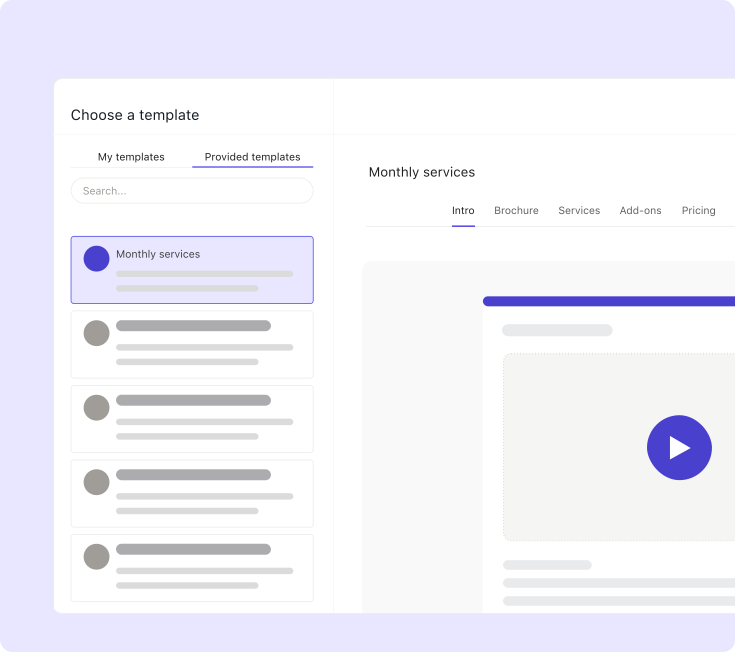
Automated proposals and engagement letters help protect revenue by defining scope, pricing, terms, and payment expectations before the client accepts the work. Ignition proposal templates combine the service description, fee, billing schedule, and engagement terms into one document the client reviews and signs electronically.
That single acceptance path reduces the ambiguity that can fuel scope creep and billing disputes later. When pricing and terms live in a signed document instead of an email thread, the terms are settled instead of open to dispute mid-engagement.
Build a reusable proposal template with five consistent elements: service description, fee, billing cadence, terms, and e-signature requirement. That gives every new engagement the same starting point.
Smart Billing that syncs with Xero, QuickBooks, and Gusto
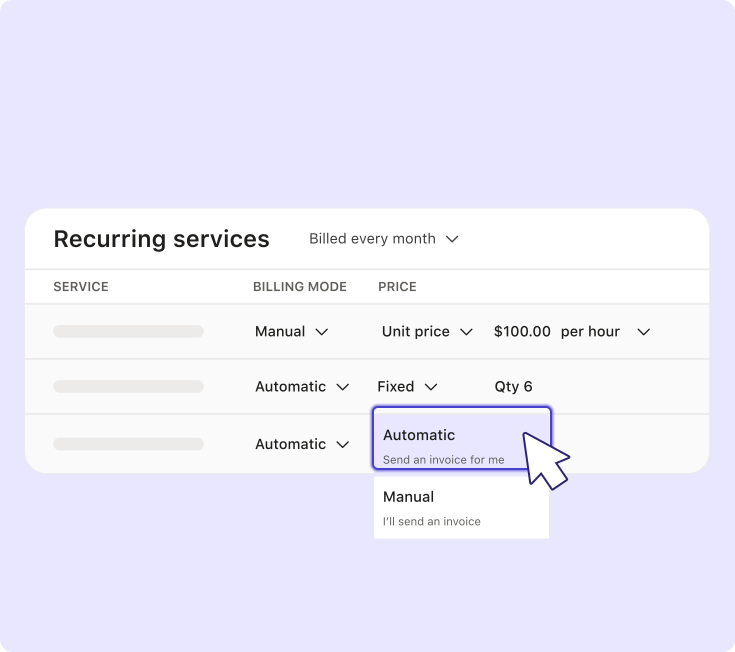
Smart Billing helps accepted work move into invoicing systems without duplicate entry, connecting client acceptance with invoicing and payment tracking. That closes the gap where firms retype the same engagement details across separate tools.
The sequence follows the same basic path:
- Define the services and billing terms in the proposal.
- Secure client acceptance.
- Create or sync the billing information.
- Collect or track payment against that engagement.
Each step feeds the next, so accepted scope doesn't sit in a separate document waiting for someone to build an invoice manually. For firms using Xero, QuickBooks, or Gusto, Ignition can connect with the existing stack rather than forcing a replacement. Learn more about how to automate billing from proposal to payment.
Accounting firms face the same billing gap regardless of which PM tool they use
The billing gap shows up in accounting firms at every size and across every practice management platform. A tax firm managing 80 clients in Karbon can have every deadline tracked and every work item assigned, while engagement letters sit unsigned, retainer invoices go out late, and advisory scope changes never make it into billing.
Switching from Karbon to TaxDome or Canopy doesn't change that pattern, because the problem is in what happens after a client accepts the scope.
A CPA firm adds a new advisory service mid-engagement. The partner walks the client through the scope on a call, the client agrees, and someone on the team notes it in Karbon. But there's no formal change order, no updated engagement letter, and no invoice trigger. The work gets delivered, the engagement closes, and the advisory time goes unbilled.
The fix is the same regardless of which PM platform the firm runs. Separate delivery coordination from the client-facing path to payment, and evaluate the billing layer on its own terms. Firms comparing options can look at billing automation built for accounting practices to see how connecting proposals, scope changes, and payment collection in one workflow closes that gap.
Pair practice management with a revenue engine built for client billing
Firms don't necessarily have to choose between Karbon and Ignition. The bigger question is whether accepted work turns into collected payment without unnecessary manual follow-up.
Keep or choose the practice management platform that runs internal operations smoothly, and audit where proposals, renewals, billing, or payments still rely on email threads and manual work. That's the gap Ignition is built to address by adding agreements, billing, and payment collection alongside the systems already in place.
Get paid without the manual chase.
Layer automated agreements, billing, and payment collection on top of the practice management tools you already use.
Frequently asked questions
-
Small firms should start with their highest-friction workflow rather than the longest feature checklist. Map the process from client request through task completion, invoice creation, and payment collection, then identify where delays or duplicate work occur. This keeps the stack focused and reduces the risk of paying for overlapping features.
-
Accounting professionals usually flag pricing, seat minimums, client portal quality, and workflow flexibility when discussing Karbon alternatives on Reddit. These conversations can surface practical operator concerns, but they rarely assess billing automation or revenue leakage in depth. Use forum feedback as context, then validate each option against the firm's actual workflows and cash flow goals.
-
Review sites are useful for identifying patterns in ease of use, support, and implementation friction. They become less reliable when workflow tools, professional services automation platforms, and billing platforms are grouped as if they solve the same problem. Compare reviews within the same product category before deciding whether the firm needs a replacement, an extension, or both.
-
Some of the hidden costs include migration time, template rebuilding, staff training, data cleanup, and additional billing or payment tools. A lower-priced plan may still cost more operationally if it adds manual invoicing or requires duplicate data entry. Assess the total workflow cost rather than comparing plan prices alone.
-
The firm should define how accepted work becomes billable revenue throughout the rest of its stack. Set proposal templates, payment terms, renewal rules, and scope-change processes before rolling the selected platform out firmwide. Document each handoff from client acceptance through invoice creation and payment collection so ownership is clear.