The firm's checklist for filling out Form 1040 at scale



 Copied to clipboard.
A mid-sized firm might run 60 individual returns through the pipeline in a single week during peak filing season, each one due before the same deadline.
Form 1040 is the standard IRS form individual taxpayers use to report annual income, calculate adjusted gross income and taxable income, and reconcile what they owe against taxes already paid through withholding or estimated payments. Knowing how to fill out Form 1040 correctly matters for every one of those clients, but accuracy alone doesn't protect your firm's margin or cash flow.
Capacity is already tight this season, and firms feel it long before they file the first return. This piece walks through Form 1040 line by line, then shows how to scope, price, and bill that same work, so volume doesn't quietly erode profit.
Key takeaways
- Return complexity, like extra schedules, itemized deductions, and multiple income streams, should set the client's fee before preparation begins.
- Starting a return before every W-2, 1099, and prior-year document arrives creates avoidable rework later in the season.
- Filing deadlines strain a firm's staffing capacity just as much as they strain any single taxpayer.
- Collecting payment at the time of signing protects cash flow better than invoicing after a return is filed.
- Firms that treat each 1040 engagement as separate paperwork struggle to scale volume without adding staff.
Identify the right Form 1040 version
A client's filing situation determines whether your firm routes the engagement to Form 1040, 1040-SR, 1040-NR, or 1040-X, and getting this right at intake sets the entire preparation workflow. Each version serves a distinct client profile, according to the current IRS Form 1040 instructions:
- Form 1040: Most individual filers with typical wage, investment, or self-employment income
- Form 1040-SR: Clients age 65 and older who want the larger-print layout and standard deduction chart built for that group
- Form 1040-NR: Nonresident aliens with U.S. income who don’t meet the substantial presence test
- Form 1040-X: Amendments to a return already filed
Scope and price the engagement upfront
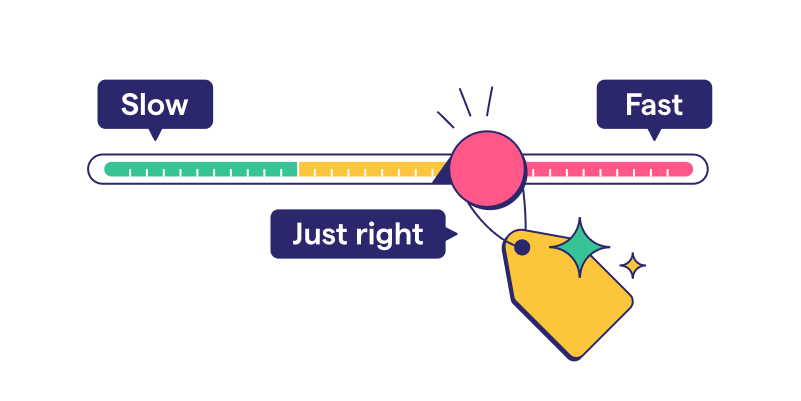
Return complexity should set the fee for a Form 1040 engagement before your firm opens a single document.
Complexity shows up in three specific signals:
- Itemized deductions
- Multiple schedules, like Schedule C or Schedule E
- Several income streams from freelance work, rental property, or investments
Each of these adds preparation time and risk.
Locking that price means locking the scope first. Ignition's automated engagement letters let a firm document exactly which schedules and income sources are included before work starts, so added complexity discovered mid-return triggers a scope conversation, and your firm doesn't absorb the cost.
Pairing that with Ignition's AutoPricing helps your firm apply consistent, complexity-based fees across a full book of returns, meaning higher-effort clients aren't subsidized by flat pricing.
Tax season without the billing burnout
Watch how accounting firms handle scoping, billing, and payment across a full season of 1040 clients.
Collect the client's documents and data
Your firm shouldn't start Form 1040 preparation until it has the client's W-2s, 1099s, prior-year adjusted gross income, Social Security numbers, and other required tax records on file. The IRS advises waiting until all tax records have arrived before preparing a return, and that guidance applies just as directly to the firm doing the work.
Starting early on partial records doesn't save time. It creates mid-preparation stops, forces a second review when missing forms arrive, and adds client follow-up during the busiest weeks of the filing window.
A structured intake process is how your firm enforces this discipline. Request every required item upfront, confirm completeness against a checklist, and only then release the return to preparation. Firms building this into their onboarding can start by creating an effective client intake form.
Complete Form 1040 line by line
A consistent Form 1040 workflow moves through four stages in order, from filing status through filing. The IRS processed more than 165 million individual returns in 2025, with about 94% filed electronically, so a repeatable sequence protects accuracy at scale. Skipping a stage, or working out of order, tends to surface as a missed deduction or a recalculated credit later in review.
The four steps below break that workflow down:
- Filing status and personal details
- Income and required schedules
- Adjusted gross income (AGI) and deductions
- Credits through filing
Following the same order on every return, regardless of complexity, keeps preparer time predictable across a full client roster.
Set filing status and personal details
Your firm must set the correct filing status and confirm personal and dependent details before applying any deduction or credit. Every downstream calculation on Form 1040 depends on this choice.
There are five filing status options:
- Single
- Married filing jointly
- Married filing separately
- Head of household
- Qualifying surviving spouse
Each one shifts the standard deduction amount, the tax brackets applied, and eligibility for specific credits, so picking the wrong one early can throw off the entire return.
Personal details need the same scrutiny. Legal name, Social Security number, and address must match IRS records exactly. Dependent information, including relationship and residency, determines which credits apply later.
Confirm all of this during intake. Rediscovering a missing dependent or an incorrect filing status after starting the return forces rework and delays delivery.
Report income and identify required schedules
A client's income sources determine which schedules attach to Form 1040, and misidentifying them is a common error.
- Extra income like unemployment benefits or gambling winnings belongs on Schedule 1.
- Interest and dividend income over $1,500 requires Schedule B.
- A client running a sole proprietorship needs Schedule C to report profit or loss.
- Stock sales or other capital transactions trigger Schedule D.
- Rental property or income from a partnership calls for Schedule E.
Each schedule adds documentation, calculation, and review time to the engagement. A client with a W-2 only needs the base form, but a client with a side business, investment sales, and a rental property needs additional schedules.
Calculate AGI, deductions, and taxable income
The standard-versus-itemized deduction decision is the step that converts adjusted gross income into taxable income. Before this step, the return shows AGI only, a figure calculated from total income minus adjustments. Nothing has reduced that number yet.
Your firm now checks whether the client's deductible expenses, like mortgage interest, state and local taxes, and charitable gifts, exceed the standard deduction amount for their filing status. If they don't, the standard deduction applies, and the math is quick.
If they do, the client itemizes, and the return requires Schedule A to list each deductible expense.
Apply credits, calculate tax, and file
Your firm closes the return by applying eligible credits, calculating the tax owed or refund due, then securing signatures and filing.
Additional tax and less common credits route through Schedule 2 and Schedule 3, while self-employed clients need Schedule SE to calculate self-employment tax. On the credit side, education expenses often qualify for the American Opportunity Credit or the Lifetime Learning Credit, depending on the client's enrollment status and income.
Once the return is signed and filed, the engagement isn't necessarily finished. Some clients receive IRS Letter 5071C as an identity-verification request tied to their filed return. Mention this possibility to clients before filing, so an unexpected letter doesn't read as a red flag on their return.
Manage deadlines as a capacity issue
Treat the filing deadline as a staffing and communication challenge for your firm, especially as the IRS operates with a leaner workforce. A hard date only matters because of what it does to preparer hours, review queues, and client responsiveness in the weeks leading up to it.
The external pressure is real. The IRS expected about 164 million individual returns in the 2026 filing season, while operating with roughly 25% fewer workers, which means slower agency turnaround on notices, refunds, and identity verification.
That strain lands on your firm as extra follow-up work per return. Build in buffer time for IRS delays when assigning staff, and confirm the exact current deadline on the IRS Tax Topic page.
Firms that build this buffer into their staffing calendar earlier in the season absorb agency delays without pushing every return into the final week. A review queue that backs up in the final days puts every remaining return at the same risk, regardless of when intake started. Reviewing capacity every week helps your firm catch a staffing shortfall before it becomes a missed deadline.
Bill and collect payment for returns
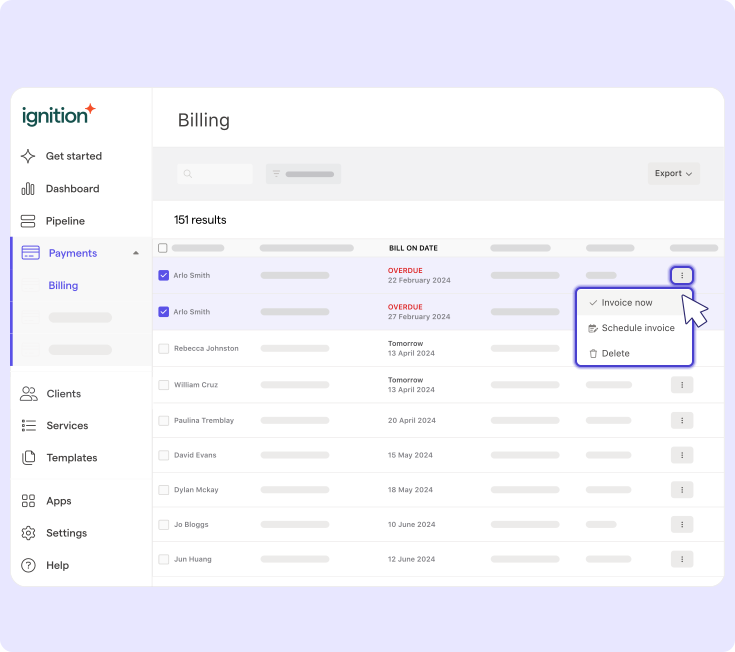
Resolve payment for Form 1040 work at the moment a client signs the engagement. Waiting until delivery to raise the payment question puts your firm in collections mode during the busiest weeks of the year.
Collect card or bank details, or a retainer, at the moment of signing. Once that information is on file, payment doesn't depend on tracking down a client who's already moved on to other things.
Automated invoicing tied to Smart Billing integrations with Xero, QuickBooks Online, and Gusto removes that manual step. Invoices generate and process on schedule, so no one on your team has to stop preparing returns to follow up on payment.
Run tax season on one platform
Centralizing proposals, engagement letters, billing, and payment gives your firm one operational workflow for every Form 1040 client, replacing a patchwork of spreadsheets, PDFs, and separate invoicing tools.
Fewer handoffs between scoping, contracts, and billing means fewer chances for a return to start without signed terms or payment on file. That's what lets your firm add another hundred 1040 clients without adding another staff member just to manage the paperwork behind them.
Ignition’s Deals pipeline tracks every engagement in one view, so your firm can see which 1040 clients have signed, which are pending, and which still owe payment details. AutoPricing handles the other side of volume. When filing complexity shifts or fees need an annual bump, your firm can update pricing across a batch of returns at once.
Other forms your firm may need
A Form 1040 client’s business interests can trigger adjacent filing work your firm should flag during intake. Three cases come up most often:
- Sole proprietorship: The client reports that activity on a Schedule C attached to their personal return.
- S corporation or C corporation: The business needs a separate corporate filing on top of the personal return.
- Partnership stake: The partnership files Form 1065, and the resulting Schedule K-1 flows onto the client’s personal return.
Self-employed income stays inside the 1040 engagement, but an incorporated business pulls the client into Form 1120 filing requirements your firm needs to price and staff separately. Flagging these entity types during intake keeps the corporate and partnership work priced and scheduled alongside the individual return.
Before: An engagement letter scoped only for an individual return, with the corporate filing discovered mid-season and squeezed in unpaid.
After: Intake surfaces the business entity upfront, and the proposal covers personal and corporate filing as one coordinated engagement.
Make 1040 season predictable and profitable
Getting every line of a Form 1040 right is the baseline. The firms that come out of tax season ahead are the ones who priced for complexity before opening a single document, collected full documentation upfront, and had payment secured before the return ever hit review.
Ignition doesn't touch the tax calculation. It manages everything around it. That's the workflow that turns accurate returns into a profitable season.
Make 1040 season profitable, not just busy
Connect scope, billing, and payment so every engagement is set before the first return opens.
Frequently asked questions
-
An amended return, filed on Form 1040-X, falls outside the scope of the original engagement letter and warrants a separate fee. Firms should treat amendments as new work triggered by a change order. Automated billing tools can generate a fresh invoice for this add-on work without needing a brand-new proposal.
-
Form 1040 only covers federal income tax, so any state return is a distinct filing with its own forms and deadlines. Firms that prepare both should scope and price state returns as a separate line item in the engagement letter. Bundling state and federal prep into one proposal keeps the client relationship simple, while still billing accurately for the added work.
-
Preparation time varies based on the number of schedules and income sources involved. A simple W-2 return typically takes far less preparation time than a return with business income or multiple investments, which involves more schedules and more review. Firms that estimate schedule complexity upfront can staff and price each return more accurately.
-
Ignition isn't a tax preparation platform and doesn't calculate figures on Form 1040 or any of its schedules. Instead, it handles the business side of the engagement that surrounds the actual tax work, like the proposal, engagement letter, billing, and payment collection. Firms still use their tax prep software of choice for the calculations and rely on Ignition to manage everything from signed proposal to collected payment.
-
If new income sources or additional schedules surface mid-engagement, the extra work falls outside the original agreement and should be billed separately. A change order updates the scope and price without the client having to sign an entirely new proposal. Tools like Ignition's Instant Bill feature let firms invoice for that added complexity right away.